
Connect an agent to AnyTTY
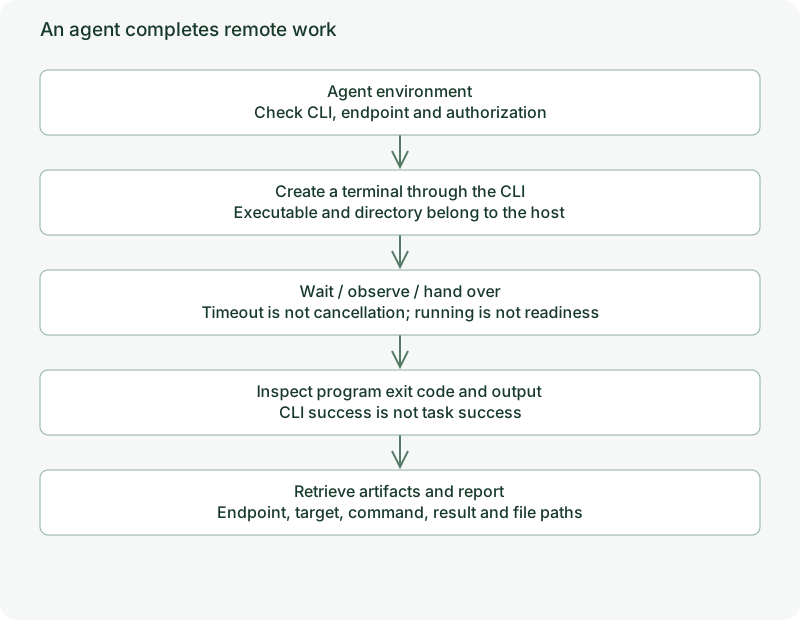
AnyTTY gives agents terminal and file operations on authorized devices. An agent creates observable tasks, reads real output and state, and delivers results while you inspect the same tasks from the TUI or App.
Prerequisites
The agent environment needs the anytty CLI, a configured endpoint and appropriate grants. The target needs project dependencies and a valid working directory. Parse JSON with jq or a language library.
Inspect anytty endpoint list and terminal list --endpoint ENDPOINT --json. Do not ask an agent to guess addresses, keys or grants from display labels.
Example task contract
Use the configured workstation endpoint and /srv/project directory. Confirm the device and directory, create a separately named terminal, and retain the returned target. Wait for exit and inspect exit_code. Collect relevant output and report files. Keep failed tasks for review and report target, command, exit code and artifact paths. If human input is needed, stop sending input and identify the task.
Replace the endpoint, directory and actual check command. This describes the AnyTTY workflow; your task instructions determine which work is authorized.
Why independent tasks
Named daemon tasks remain observable after an individual tool call ends. People can find them in the manager, and agents can continue with the stable target.
Use AnyTTY where remote access, long execution, observation or handoff helps; routine short local reads need not become remote terminal tasks.
Follow remote tasks, builds and services, handoff and file delivery. JSON rules live in script results.