
On this page
Configuration and loading
Local YAML controls TUI themes, controls, bindings and interaction preferences. Locate the loaded file, make a small change and validate it before applying a larger configuration.
Locate configuration
anytty config paths
anytty config show
anytty config show --effective
The default is $XDG_CONFIG_HOME/anytty/tui-v3.yaml, commonly ~/.config/anytty/tui-v3.yaml without an XDG override. Use config paths as the authority on your OS.
show inspects source configuration; show --effective includes defaults and supported environment overrides. Review custom text before sharing output.
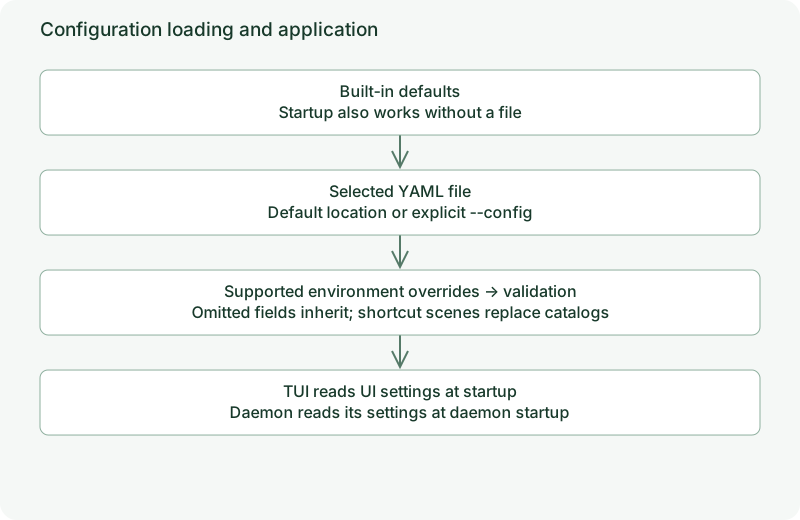
Loading order
- Built-in defaults.
- The default file or the file selected by
--config FILE. - Explicitly supported environment variables.
- Validation before client startup.
A missing default file is allowed; a missing explicitly selected file is an error. Arbitrary ANYTTY_ names do not override arbitrary fields. See the reference.
Make a first change
anytty config set tui.chrome.panel_presentation card
anytty config validate
Reopen the TUI to see independent card borders. Equivalent YAML:
version: 1
tui:
  chrome:
    panel_presentation: card
The parser accepts a YAML subset: use two-space indentation and mappings, without lists, anchors or complex YAML features. Quote color strings. The current schema version is 1.
When changes apply
TUI preferences load at startup; reopen the TUI after editing. Changing a theme does not require restarting the daemon. Settings under daemon: load with the background service; see daemon settings.
Preferences do not contain workbench layouts, terminal processes or device grants. tui.profile is currently a reserved name, not automatic profile selection or multi-file merging.
Revert and experiment
Remove an override with anytty config unset tui.chrome.panel_presentation, validate and reopen. Back up the file before larger edits. Use anytty --config ./trial.yaml for a separate trial configuration.
Continue with appearance, bindings, interaction and complete examples.