
On this page
How AnyTTY works
Separate where you interact, where tasks run, and how clients connect. This explains why tasks can survive closing the TUI and why a phone can open a terminal already used on a computer.
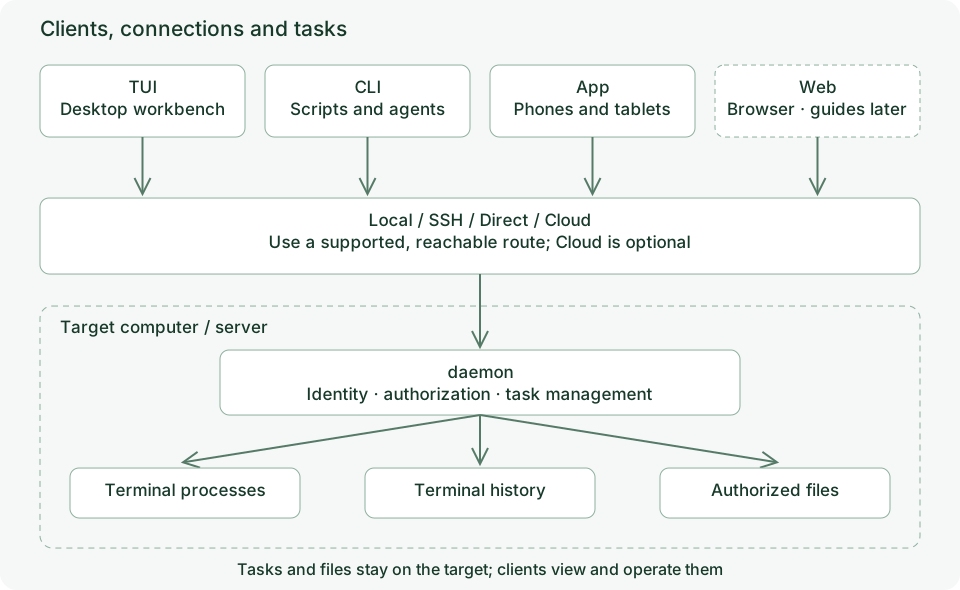
Responsibilities
| Component | Responsibility | Boundary |
|---|---|---|
| TUI | Interactive desktop workbench, layouts and bindings | A pane is a view of a process |
| CLI | Individual commands and structured script operations | No persistent workbench display required |
| Phone/tablet App | Touch interaction, devices and files | Remote processes run on the target machine |
| Web | Browser client entry point | Tutorials are deferred in this edition |
| daemon | Target processes, state, history and connection services | OS file permissions still apply |
| Cloud | Optional enrollment and cross-network connectivity | Local tasks remain on their owning machine |
Endpoints, terminals and views
An endpoint identifies a target device and its saved connection configuration. local is the local entry point. A remote endpoint may have multiple network routes and a changeable display name.
A terminal is a task managed by the target daemon, with an ID, state, command, working directory and output. The CLI identifies it as ENDPOINT:TERMINAL_ID; a display name alone is insufficient when names overlap.
A pane or view is where a client displays that terminal. Multiple clients can open the same terminal. Workspaces, tabs and panes organize TUI views. Closing a view and killing a task are distinct operations.
Following an operation
When you type pwd on a phone, the App connects and authenticates, then sends input to the target terminal’s PTY. The shell executes on that machine and output returns to viewers. File downloads also read the target filesystem.
Working directories, installed programs, environment variables and OS permissions therefore belong to the target machine.
Startup and configuration boundaries
Run anytty for everyday desktop use. The TUI starts the local daemon when necessary and opens the workbench. Explicit daemon management is for maintenance, unattended operation and diagnosis.
TUI preferences, workbench layout, terminal state and device grants are separate concerns. Read TUI configuration for interface settings and daemon configuration for background behavior.